Secure Payment Confirmation (SPC) Overview
On this page:Overview
Secure Payment Confirmation (SPC) is a FIDO(Fast Identity Online)-based authentication method used to securely confirm cardholder payments that are initiated through a web browser. It acts as an alternative to traditional challenge methods, like typing in a One-Time Passcode (OTP) or password.
It utilises the Secure Payment Confirmation Web API (SPC API), as defined by the W3C.
It requires a Cardholder to be using a Browser which has support for the SPC API.
It requires the Cardholder to have registered a Passkey with the Issuer of their card.
Key Characteristics
Uses Device Biometrics/FIDO: SPC leverages platform FIDO authenticators on the cardholder’s consumer device. This means the cardholder authenticates the transaction using built-in device security features, such as Windows Hello or Apple TouchID.
Browser-Only: SPC is specifically designed for transactions taking place via the SPC API on a browser. It is not supported in App-based authentication flows.
Who initiates SPC?:
- 3DS Requestor Initiated: If the Client (3DS Requestor) has coded their site to support the additional SPC requirements they can indicate that they support SPC using the
threeDSRequestorSpcSupportfield. - ACS Initiated: The issuer’s ACS detects that the cardholder’s Browser supports the SPC API and they have previously registered an Issuer Passkey.
- 3DS Requestor Initiated: If the Client (3DS Requestor) has coded their site to support the additional SPC requirements they can indicate that they support SPC using the
The Authentication Process
Once the SPC API is invoked, the Cardholder is prompted to verify the purchase with their authenticator.
The native browser UI shows details of the payment to be verified, including details of the store, the payment method that will be used and the value in local currency.
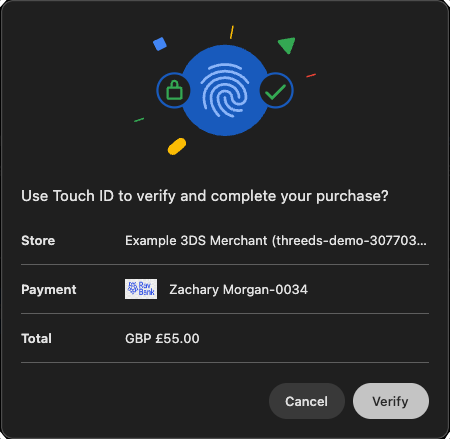
Clicking verify will display a request from the platform Authenticator for the Cardholder to authenticate themselves.
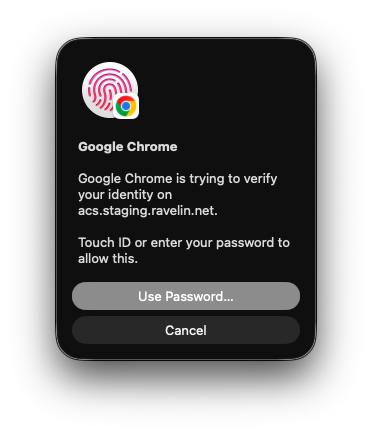
A successful FIDO authentication generates “Assertion Data” containing a cryptographic signature. The ACS evaluates this assertion data and verifies the signature; if it is correct, the challenge is successful and the transaction is authenticated.
Benefits
Based on the EMV 3-D Secure specifications, the functional descriptions of Secure Payment Confirmation (SPC) highlight several key advantages for both the cardholder and the payment ecosystem:
Stronger Security: SPC leverages FIDO-based authentication. It utilizes WebAuthn to create strong, attested, scoped, public key-based credentials for the purpose of strongly authenticating users, which is significantly more secure than traditional passwords.
Frictionless Cardholder Experience: Instead of requiring the user to receive and type in a One-Time Passcode (OTP) or remember a password, SPC allows Cardholders to perform a challenge using pre-established FIDO credentials directly on their consumer device. Cardholders simply authenticate using built-in biometric features like Apple TouchID or Windows Hello.
Optimized for Web Checkout: SPC is purposefully designed to securely confirm payments initiated via a web browser. It integrates seamlessly with the browser’s Payment Request API and WebAuthn API to execute the authentication.
Implementation Flexibility: SPC provides flexibility in how a challenge is handled. It can be initiated either by the 3DS Requestor (merchant) directly through the browser API using 3DS Requestor Initiated SPC—or by the Access Control Server (issuer) from within a standard browser challenge iframe ACS Initiated SPC.
Eligibility
To be able to perform SPC there are a number of criteria which need to be fulfilled:
- Cardholder must have registered a Passkey with the Issuer
- Cardholder must have the Issuer Passkey on their current device
- Cardholder’s browser must support the SPC API
- Issuer must support SPC for the Cardholder’s card
- Client’s website must have amended Permission-Policy to support SPC requirements
- Client’s website must support SPC API (only for 3DS Requestor Initiated flow)
Registering a FIDO Authenticator
FIDO registration (enrollment) link the platform FIDO Authenticator with a specific website. In this case it is the ACS or the Issuer.
The Cardholder registers their Browser’s FIDO Authenticator with the ACS (Issuer).
The Issuers determine how the registration process will be performed, as it is not part of the EMVCo 3DS2 specification. They may have a section on their website for maintaining Passkeys or they may offer the Cardholder the option to create a passkey during the successful challenge flow.
Once the passkey is registered the Issuer will be able to use it during future SPC based authentications.
The image below is a simulated version of how an Issuer may prompt a Cardholder to create a passkey during a successful challenge flow.
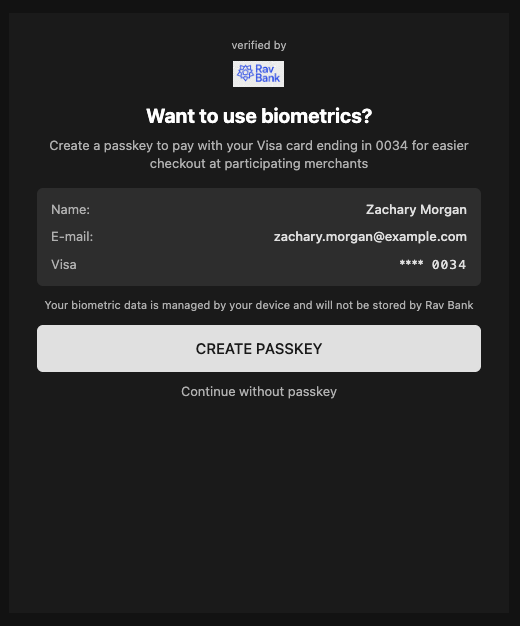
This allows the Passkey to be created on the Cardholder’s device using a platform authenticator on a supported Browser.
The private key details are store securely on the Cardholder’s device and the public key credentials are stored on the Issuer’s platform for future verification of assertion data.
Checking for Browser Support (Client logic)
Support for SPC in browsers is gradually being implemented by the providers. You can check this site for the latest status on browser compatability.
If you are choosing to implement the 3DS Requestor Initiated flow you will want to know if your website is running on a supported browser.
There is a section in the SPC specification for “4.6 Checking if Secure Payment Confirmation is available”.
Below is a javascript snippet which can be used to check if the browser supports the SPC API.
const spcAvailable =
    PaymentRequest &&
    PaymentRequest.securePaymentConfirmationAvailability &&
    await PaymentRequest.securePaymentConfirmationAvailability() === 'available';
Checking for Browser Support (Issuer ACS logic)
For the SPC flow to be successful the Issuer must know that the Cardholder’s browser supports the SPC API and not just rely on the threeDSRequestorSpcSupport being set to Y.
Therefore during the Browser flow Method request the Issuer’s ACS will run some Javascript in the Cardholder’s browser similar to above. The result will be posted back to the ACS so when the Authenticate request arrives for the same threeDSServerTransId they know if the SPC API is or isn’t supported.
Checking for Issuer Support
Not all Issuer’s will support SPC and they may not support it on all the types of cards they provide. The Version Request can be used to determine if SPC is supported.
See Browser flow version request for general version request instructions.
An example Version Response, when the payment card supports 3D Secure 2, is shown below:
{
  "status": 200,
  "timestamp": 1771840003,
  "cardScheme": "Visa",
  "data": {
    "transactionId": "123-abc-XYZ",
    "threeDSServerTransID": "a1287c77-6a17-4057-9e51-ba83d11e1a73",
    "availableVersions": ["2.3.1"],
    "versionRecommendation": "2.3.1",
    "acsStartProtocolVersion": "2.3.1",
    "acsEndProtocolVersion": "2.3.1",
    "dsStartProtocolVersion": "2.3.1",
    "dsEndProtocolVersion": "2.3.1",
    "threeDSMethodURL": "https://www.example-acs.com/method",
    "acsInfoInd": ["01", "02","07"]
  }
}
For SPC to be supported by the Issuer the version response acsInfoInd must contain a value of 07 = SPC Authentication Supported.
Permissions policy
Permissions-Policy is an HTTP response header that tells the browser which origins (sites) are allowed to use certain browser features in that page/frame. If a feature isn’t allowed by the policy, the browser blocks it (e.g. the API is disabled or returns an error).
When updating your website to support SPC you need to add some extra permissions to the page handling the ACS challenge iframe. The SPC API requires additional permissions which need to be enabled to function correctly.
The Permissions-Policy must be set in your backend with these values payment=*, publickey-credentials-create=*, publickey-credentials-get=*.
These broad permissions are required as we are unable to determine in advance which Issuers’ ACS host will be required for the authentication.
| Directive | Purpose |
|---|---|
payment=* | Allows use of the Payment Request API (PaymentRequest, PaymentResponse). SPC runs in the context of the Payment Request API, so without this the browser may block the payment/SPC flow. |
publickey-credentials-create=* | Allows creating WebAuthn credentials (e.g. “create passkey”). For SPC this is needed when the user registers a Passkey with the Issuer so they can use it later for SPC based authentications. |
publickey-credentials-get=* | Allows using existing WebAuthn credentials (getting an assertion). SPC uses this when the user authenticates with their Passkey (e.g. Touch ID / Windows Hello) to sign the challenge. |
Feedback
Was this page helpful?