3DS Requestor Initiated SPC
On this page:In the 3DS Requestor initiated SPC flow, the Client’s website takes responsibility for interactions with the SPC API. Whereas in the ACS initiated flow the challenge iframe from the ACS manages the logic. This provides the 3DS Requestor with far greater control of how the challenge flow appears within their website. It does not rely on embedded iframes with content from Issuers. Instead they can render pages to match their existing site to initiate an SPC Payment Request.
The 3DS Requestor can indicate to the Issuer that SPC is supported by setting the field threeDSRequestorSpcSupport = Yon the Authenticate request.
They should only do this if their website supports the SPC API and the Cardholder’s browser also supports the SPC API.
This does not guarantee that a challenge will take place, just that the Client’s website AND Cardholders browser support SPC.
3DS Requestor Initiated SPC flow diagram
See the main 3DS Browser Integration Guide for the general integration steps for collecting browser info, version request and method request. This page documents only how the flow differs from the traditional browser flow.
1st Authenticate Request
Consider any omitted fields to be the same as a regular Browser flow authenticate request.
Important Fields
The fields below are of importance in the 1st Authenticate Request:
messageVersionmessage version MUST be 2.3.1 (or higher) to be supported. It is not supported on earlier versions of the protocol.merchantNamethis is the name which will be displayed as the Store in the Payment Request UI.payeeOriginthis will also be displyed in the Payment Request UI.threeDSRequestorSpcSupportif the browser supports SPC and the Client’s website can handle the SPC flow set it toYotherwise omit the field entirely.
These fields infer to the Issuer that your site and the Cardholder’s browser are capable of supporting the SPC flow.
The 1st Authenticate Request is sent to the ACS which decides whether a challenge is required.
Example Authenticate Request for 3DS Requestor Initiated SPC:
{
  "timestamp": 1771840104,
  "areqData": {

    "messageVersion": "2.3.1",

    "merchantName": "Merchant Name",
    "payeeOrigin": "https://merchant.example.com/shopping",

    "threeDSRequestorSpcSupport": "Y",
    "threeDSServerTransID": "a1287c77-6a17-4057-9e51-ba83d11e1a73"

  }
}
1st Authenticate Response
The Issuer will respond to the Authenticate Request with a number of different transStatus values.
The Authenticate Response transStatus field describes the next action you need to take.
| Transaction Status | Description | Next Action |
|---|---|---|
Y | Authentication Successful | The transaction achieved a Frictionless authentication. Continue to authorisation using the authenticationValue from the Authenticate Response. |
C | Challenge Required | The Issuer decided the SPC flow could not be used. This could be due to the Method Data failing to show the Cardholder’s browser supports the SPC API. Or it could be that the Cardholder has not registered a Passkey with them. In these scenarios the Issuer will failover to the traditional challenge flow instead. Make a Challenge Request. |
S | Challenge using SPC | SPC Authentication flow (see below) |
See the 3D Secure API reference for full details of the Authenticate Response.
Important Fields
The fields below are of importance in the 1st Authenticate Response:
transStatusa value ofSinidicates the SPC authentication flow is being used.spcTransDatacontains the information which the Browser needs to call the SPC API to render a native PaymentRequest UI.webAuthnCredListcontains details of the credentials which have been registered with the Issuer when adding a Passkey.
Example Authenticate Response when a challenge (e.g. SPC) is required:
{
  "status": 200,
  "timestamp": 1771840105,
  "cardScheme": "Ravelin",
  "data": {
    "threeDSServerTransID": "a1287c77-6a17-4057-9e51-ba83d11e1a73",
    "acsReferenceNumber": "example-acs-reference-number",
    "acsTransID": "48cfd591-46dc-4735-bba1-5053b608a29c",
    "dsReferenceNumber": "example-ds-reference-number",
    "dsTransID": "35927076-3dd1-49b7-a644-766c57d658ac",
    "messageType": "ARes",
    "messageVersion": "2.3.1",
    "transStatus": "S",
    "spcTransData": {
      "challenge": "aOh0oq4ms3ZcipK3mZ5i4rw0YAHPmlTbvoptyDrVYMI",
      "challengeInfoText": "Please finish the Secure Payment Confirmation to complete the 3-D Secure Authentication",
      "displayName": "Cardholder's Passkey Name",
      "icon": "https://example-acs.com/icon.png",
      "issuerImageSpc": {
        "default": "https://example-acs.com/issuer_image.png",
        "dark": "https://example-acs.com/issuer_image_dark.png",
        "monochrome": "https://example-acs.com/issuer_image_monochrome.png"
      },
      "payeeName": "Merchant Name",
      "payeeOrigin": "https://merchant.example.com/shopping",
      "psImageSpc": {
        "default": "https://example-acs.com/payment_system_image.png",
        "dark": "https://example-acs.com/payment_system_image_dark.png",
        "monochrome": "https://example-acs.com/payment_system_image_monochrome.png"
      },
      "timeout": "60000",
      "value": "1234.56",
      "extInd": "Y",
      "currency": "GBP"
    },
    "webAuthnCredList": [
      {
        "rpID": "example-acs.com",
        "credentialIds": "sTa1GOLLuXMZQQWym9eNsTL8DVl3_TGeEN__dbTLWsQ"
      }
    ]
  }
}
Show SPC PaymentRequest UI
To show the SPC PaymentRequest UI a PaymentRequest must be constructed.
PaymentRequest construction
The values for the PaymentRequest constructor should be populated from values returned in the Authenticate Response
| PaymentRequest field | Authenticate Response field | Comment |
|---|---|---|
credentialIds | webAuthnCredList.credentialIds | WebAuthn Credential (Base64url-encoded). |
rpId | webAuthnCredList.rpID | Relying Party ID (this is the Origin on the Issuer’s ACS). |
challenge | spcTransData.challenge | Random string generated by the ACS to prevent replay attacks. |
instrument.displayName | spcTransData.displayName | Card or product name (Payment Instrument) to be displayed during the SPC authentication. |
icon | spcTransData.icon | Card image (Payment Instrument) URL or Data URL to be displayed during the SPC authentication. |
payeeName | spcTransData.payeeName | The name of the Store displayed in the Payment Request UI. Matches the merchantName field from the Authenticate Request. |
payeeOrigin | spcTransData.payeeOrigin | The origin of the payee that this SPC call is for (e.g. the Merchant). Matches the Payee Origin from the Authenticate Request. Fully Qualified URL. e.g. https://merchant.example |
paymentEntitiesLogos | spcTransData.psImageSpc and spcTransData.issuerImageSpc | The logos of the Payment system and Issuers are returned in the spcTransData and can by used to populate the array of logos. |
total.amount.currency | spcTransData.currency | Transaction amount currency to be displayed during the SPC authentication. ISO 4217 three-digit currency code. e.g. GBP |
total.amount.value | spcTransData.value | Transaction amount as a decimal value to be displayed during the SPC authentication. e.g. 123.45 |
The SPC specification contains a section called 1.2.2 Authentication on merchant site which describes how to construct a PaymentRequest.
/* securePaymentConfirmationAvailability indicates whether the browser */
/* supports SPC. It does not indicate whether the user has a credential */
/* ready to go on this device. */
const spcAvailable =
  PaymentRequest &&
  PaymentRequest.securePaymentConfirmationAvailability &&
  (await PaymentRequest.securePaymentConfirmationAvailability()) === 'available';
if (!spcAvailable) {
  /* Browser does not support SPC; merchant should fallback to traditional flows. */
}

const request = new PaymentRequest([{
  supportedMethods: "secure-payment-confirmation",
  data: {
    // List of credential IDs obtained from the bank.
    credentialIds,

    rpId: "fancybank.example",

    // The challenge is also obtained from the bank.
    challenge: new Uint8Array([21,31,105 /* 29 more random bytes generated by the bank */]),

    instrument: {
      displayName: "FancyBank Platinum Card",
      details: "****1234 | 01/29",
      icon: "https://fancybank.example/card-art.png",
    },

    payeeName: "Merchant Shop",
    payeeOrigin: "https://merchant.example",

    paymentEntitiesLogos: [
      {
        url: "https://fancybank.example/logo.png",
        label: "Fancy Bank",
      },
      {
        url: "https://securenetwork.example/logo.png",
        label: "Secure Network",
      },
    ],

    // Caller’s requested localized experience
    locale: ["en"],

    timeout: 360000,  // 6 minutes

    // An optional list of allowed algorithms defaulting to ES256 and RS256.
    // In this example ES256 and RS256 are allowed and ES256 is preferred.
    // Browser bound keys are not created when already present, so this
    // list is only used when the browser bound key does need to be
    // created.
    browserBoundPubKeyCredParams: [
      {
        type: "public-key",
        alg: -7 // "ES256"
      },
      {
        type: "public-key",
        alg: -257 // "RS256"
      }
    ]
  }], {
    total: {
      label: "Total",
      amount: {
        currency: "USD",
        value: "5.00",
      },
    },
  });

try {
  const response = await request.show();
  await response.complete('success');

  // response.data is a PublicKeyCredential, with a clientDataJSON that
  // contains the transaction data for verification by the issuing bank.

  /* send response.data to the issuing bank for verification */
} catch (err) {
  /* SPC cannot be used; merchant should fallback to traditional flows */
}
PaymentRequest.show()
Calling the .show() function renders the browser native UI to verify the payment.
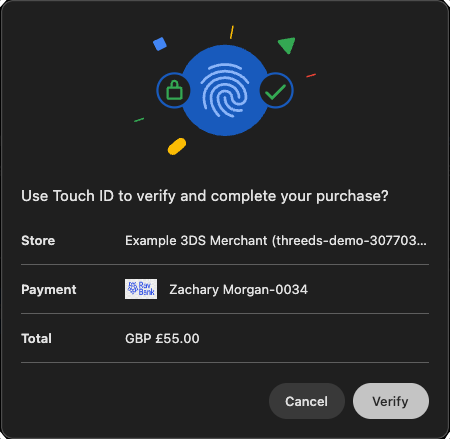
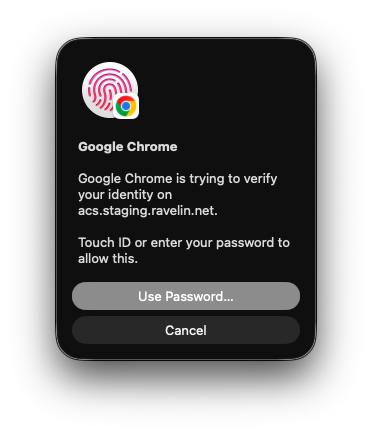
Clicking verify will display a request from the platform Authenticator for the Cardholder to authenticate themselves. This is shown as the FIDO Authentication in the flow diagram above.
Upon completion the front end code will receive a PaymentResponse from the orignalPaymentRequest.
javascript
const response = await request.show();
await response.complete('success');
The response object returned will contain the result of the Cardholder authentication. If successful it will contain .details which is the FIDO assertion data required to authenticate the payment.
2nd Authenticate Request
If the PaymentRequest was successful the website needs to construct a 2nd Authenticate Request to complete the SPC flow.
Important Fields
The fields below are of importance in the 2nd Authenticate Request:
| 2nd Authenticate Request | Source of value | Comment |
|---|---|---|
threeDSRequestorAuthenticationInfo.threeDSReqAuthData | response.details | This is the value of response.details when completing a successful PaymentRequest.show() call. |
threeDSRequestorAuthenticationInfo.threeDSReqAuthMethod | 09 | SPC Authentication. |
threeDSRequestorPriorAuthenticationInfo.threeDSReqPriorAuthMethod | 05 | SPC Authentication. |
threeDSRequestorPriorAuthenticationInfo.threeDSReqPriorAuthTimestamp | 202602251451 | Date and time in UTC of the cardholder authentication. |
threeDSRequestorPriorAuthenticationInfo.threeDSReqPriorDsTransId | 35927076-3dd1-49b7-a644-766c57d658ac | This is the value of dsTransID from the 1st Authenticate Response. |
threeDSRequestorPriorAuthenticationInfo.threeDSReqPriorRef | a1287c77-6a17-4057-9e51-ba83d11e1a73 | This is the value of threeDSServerTransID from the 1st Authenticate Request/Response. |
threeDSRequestorSpcSupport | Y | You must still indicate that SPC is supported on the 2nd request. |
threeDSServerTransID | 70f69c74-8c49-4c57-a58c-e7bb0747a449 | The 2nd Authenticate Request needs a new value so generate a unique valid 36 character UUID. |
Example Authenticate Request for sending SPC assertion data:
{
  "timestamp": 1771840105,
  "areqData": {

    "messageVersion": "2.3.1",

    "threeDSRequestorAuthenticationInfo": [
      {
        "threeDSReqAuthData": "{\"value\":{\"authenticatorAttachment\":\"platform\",\"clientExtensionResults\":{},\"id\":\"sTa1GOLLuXMZQQWym9eNsTL8DVl3_TGeEN__dbTLWsQ\",\"rawId\":\"sTa1GOLLuXMZQQWym9eNsTL8DVl3_TGeEN__dbTLWsQ\",\"response\":{\"authenticatorData\":\"kvbOheUM-tkCXeA6uQ3b2PnAcFLghWi5VF3oqBMbQj8FAAAAAA\",\"clientDataJSON\":\"eyJjaGFsbGVuZ2UiOiJhT2gwb3E0bXMzWmNpcEszbVo1aTRydzBZQUhQbWxUYnZvcHR5RHJWWU1JIiwib3JpZ2luIjoiaHR0cDovL2luZ3Jlc3MtbW9jay1hY2Nlc3MtY29udHJvbCIsInR5cGUiOiJwYXltZW50LmdldCJ9\",\"signature\":\"MEUCIQD8zi28bHYkmHhwmR-Xu3qwUJfh4GbeUcRWov5zVnhoegIga2uFWIO1RKNZO-ZEXXqAYRM74f_BSN2XYhFHliDIbpM\",\"userHandle\":\"acvmKg4uEMneXJuKM70eqg\"},\"type\":\"public-key\"},\"type\":\"public-key\"}",
        "threeDSReqAuthMethod": "09"
      }
    ],

    "threeDSRequestorPriorAuthenticationInfo": [
      {
        "threeDSReqPriorAuthMethod": "05",
        "threeDSReqPriorAuthTimestamp": "202602230948",
        "threeDSReqPriorDsTransId": "35927076-3dd1-49b7-a644-766c57d658ac",
        "threeDSReqPriorRef": "a1287c77-6a17-4057-9e51-ba83d11e1a73"
      }
    ],

    "threeDSRequestorSpcSupport": "Y",
    "threeDSServerTransID": "70f69c74-8c49-4c57-a58c-e7bb0747a449"

  }
}
Note: the threeDSReqAuthData needs to be a JSON-serialized string. The example below is the same data pretty printed for readability.
Example threeDSReqAuthData pretty printed:
{"value":
    {
        "authenticatorAttachment":"platform",
        "clientExtensionResults":{},
        "id":"sTa1GOLLuXMZQQWym9eNsTL8DVl3_TGeEN__dbTLWsQ",
        "rawId":"sTa1GOLLuXMZQQWym9eNsTL8DVl3_TGeEN__dbTLWsQ",
        "response":{
            "authenticatorData":"kvbOheUM-tkCXeA6uQ3b2PnAcFLghWi5VF3oqBMbQj8FAAAAAA",
            "clientDataJSON":"eyJjaGFsbGVuZ2UiOiJhT2gwb3E0bXMzWmNpcEszbVo1aTRydzBZQUhQbWxUYnZvcHR5RHJWWU1JIiwib3JpZ2luIjoiaHR0cDovL2luZ3Jlc3MtbW9jay1hY2Nlc3MtY29udHJvbCIsInR5cGUiOiJwYXltZW50LmdldCJ9",
            "signature":"MEUCIQD8zi28bHYkmHhwmR-Xu3qwUJfh4GbeUcRWov5zVnhoegIga2uFWIO1RKNZO-ZEXXqAYRM74f_BSN2XYhFHliDIbpM",
            "userHandle":"acvmKg4uEMneXJuKM70eqg"
        },
        "type":"public-key"
    },
    "type":"public-key"
}
2nd Authenticate Response
If the ACS successfully verifies the assertion data against the registered credentials a successful authentication should be returned like the one below.
See the 3D Secure API reference for full details of the Authenticate Response.
Example Authenticate Response when verification of assertion data was successful:
{
  "status": 200,
  "timestamp": 1771840106,
  "cardScheme": "Ravelin",
  "liabilityShifted": true,
  "data": {
    "threeDSServerTransID": "70f69c74-8c49-4c57-a58c-e7bb0747a449",
    "acsReferenceNumber": "example-acs-reference-number",
    "acsTransID": "2477117d-eb83-4c1b-a3b0-f89a30fc9cf7",
    "authenticationType": "01",
    "authenticationValue": "bG9va2l0c2FuZWFzdGVyZWdnIQo=",
    "dsReferenceNumber": "example-ds-reference-number",
    "dsTransID": "9c9b39d8-f2c9-41d8-b19e-66692d17d0b4",
    "eci": "05",
    "messageType": "ARes",
    "messageVersion": "2.3.1",
    "transStatus": "Y",
    "deviceInfoRecognisedVersion": "1.0.0"
  }
}
If the verification fails the ACS will failover to a traditional Challenge Request returning a transStatus = C.
Feedback
Was this page helpful?